Cristin Coppess Photography
JRN 302 - Media Graphics & Visual Comm.
Final Assignments
Simpsons Photoshop
This assignment is my photoshop debut. My goal was to incorporate Homer Simpson into a movie still that he clearly did not belong in as seamlessly as I was able. To do so, I had to use several techniques and tools to retouch and clean up the graphic of Homer and remove it from its original setting. His shirt color was changed via a combination of the brush tool and color replacement. From there, I used the clone stamp tool to embed him in the greenery and a few background removing and spot-healing techniques to blend him with the background image. The first attempt was a tad messy, so I had to go back and further clean it up once I had a handle on what I was doing.

Photoshop Pictograph
For the pictograph assignment, I knew I wanted to use simple techniques to make my design stand out. I was inspired by the old "Weird But True" National Geographic books I often read in elementary school. I decided to use a warm/cool color pairing for contrast, and went with yellow and blue the first time around to feature the color of the frog in the fact. The type was the most difficult part to figure out. Originally, I had the frog in the bottom left corner, but adjusted to the middle and rotated to increase readability. Going back, I adjusted the colors scheme to feature purples instead of blues to add more contrast than the original design.

W.E.T. Layout
Going into this assignment, my thought process was simpler is better. I wanted the images to have a large visual impact, and minimize business by limiting the scope of how I used type. I also knew I wanted to try and wrap the text around a centered image that I embedded in the copy. I think the end result was a symmetrical design, which is what I wanted. In revisions, I added a few simple elements and effects to create more contrast and allow the layout to be more visually interesting.

Logos & Type
This assignment was actually pretty challenging. I wanted to include a lot of variety in my technique and the end product for each of the four logos. Representing a university with very identifiable branding in different ways was a fun experiment-- I wanted to incorporate those elements in a recognizable but new way. After initial feedback, I updated each of the logos to further enhance each design.


InDesign Advertisement
I wanted this layout to really highlight the beverage itself. I based the idea off of the fact the brand had an established look/vibe and tried to match its new look. Simple, but communicative. I tried to replicate a contemporary style of design with the use of bold, attention grabbing colors. I created a color theme based off of the can, and used organic shapes to highlight my message.

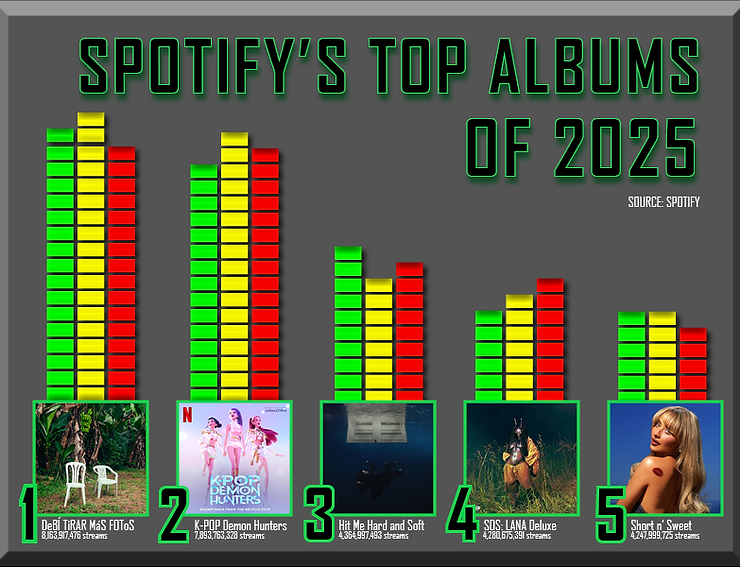
InDesign Infographic
I tried to tie in the statistics I was highlighting to visual elements of listening to music. Namely, that was the audio levels you might see on a boombox or audio-editing software. I based the colors off of Spotify's logo as well as the typical red, yellow, and green you would see in audio production. I also added effects to the type and bars to make it seem as if they were glowing.